Featured Articles

Boost Your Website Traffic with High Quality DA/PA 40+ Backlinks
Apr 7, 2023

In today’s competitive world, one must be knowledgeable about the latest online bus...
Oct 12, 2018
When using T6 servo motor, if jitter occurs, you can eliminate it through the following methods.
When the brake is open, the mechanical installation is balanced, the coupling does not shift, the gear meshes well, the encoder wiring is correct, and there is no interference, adjust the inertia, rigidity and other parameters of T6.
1. The wiring is correct (the motor will be automatically recognized by the driver).
2. Use the “operation test” to test whether the motor is running normally.
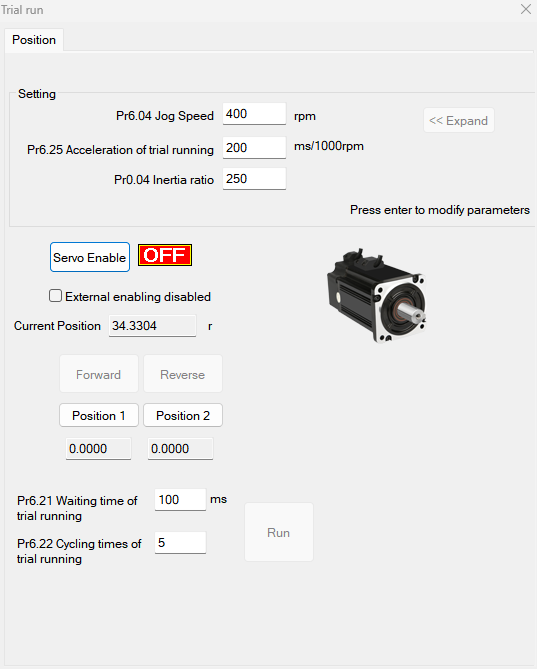
3. Set the Pr400 value (external servo on signal Pr400=83; internal signal Pr400=3).
4. Select the control mode Pr0.01. (0: Position mode, 1: Speed mode, 2: Torque mode).
5. Connect the motor to the load and adjust the inertia ratio (Pr0.04).
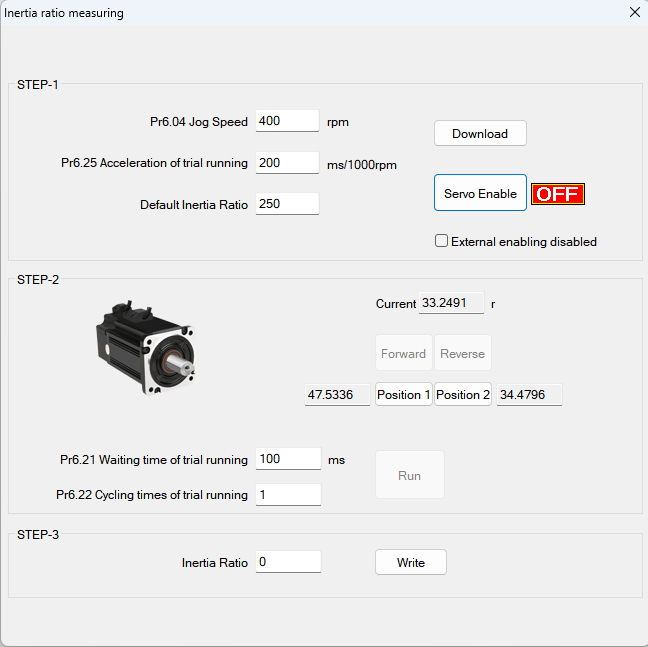
Before setting other parameters (such as PID settings for position loop or speed loop), it is very important to find out the inertia ratio of each axis so as to obtain the best performance. If an axis needs to be tested, connect the motor to the load.
Ensure that the axis can move within a safe distance to avoid any interference and ensure the safety and accuracy of the test. Inertia ratio identification, preconditions:
A. Servo is disabled, B. Positive limit and negative limit are invalid.
step:
a. Set the jog speed Pr6.04. The setting should not be too large (300~1000rpm is recommended), set Pr6.25 (50~100 ms/1000rpm is recommended), and set the default inertia ratio. Download these settings and select Servo Enable.
b. Click "Forward" to make the motor run in the forward direction, and click "Position 1" to save position limit 1. Click "Invert",
Make the motor run in the reverse direction and click "Position 2" to save position limit 2. Click "Run" to start inertia ratio identification.
c. After completion, click "Write" to save the inertia ratio identification results and input them into NVM.
6. Connect the motor to the load and adjust the stiffness of each axis (Pr0.02, Pr0.03).
1).The motor is in stop state (servo enable is turned off). The inertia ratio needs to be set correctly, otherwise it will affect the debugging effect.
2). Set Pr0.02 (real-time automatic adjustment) = 0x01/0x11 or 0x02/0x12; then set Pr0.03 (machine rigidity setting)
(default) to set.
3). Turn on the servo enable, allowing the machine to operate according to normal conditions, and start estimating the load characteristics. associated control parameters
will be set automatically.
4). Improve the responsiveness of the motor by increasing the setting value of Pr0.03 (machine rigidity setting).
Please observe the positioning time and whether there is obvious vibration in the machine, and set the rigidity value to the maximum without vibration.
5).Save the result and write it into EEPROM.
7. If necessary, adjust Pr2.22 and Pr2.23 to make the movement smoother.
8. Set the value of "pr006,007,008,009,010".
9. Adjust Pr0.00 to obtain greater stiffness.
a. Select the correct control method: Pr0.01 = 0,
b. Set Pr0.02=1 for interpolation movement,
c. Set the inertia ratio: Pr0.04,
d.Set stiffness: Pr0.03,
f.Set Pr0.00:
1) If there is no multi-axis synchronous motion, set Pr0.00 to 1 or greater than 10,
2) If multi-axis synchronous motion is required, set Pr0.00 to be the same for all axes.
3) If Pr0.00 is greater than 10, set from 100 or 150, 200, 250, ....
Notice:
1. First establish the correct control method, correct specific inertia and stiffness.
2. Do not change the value of Pr0.00 when the motor is running, otherwise vibration will occur.
3. If used in manual mode, set a small value from the beginning. A smaller value means smoother operation, and a larger value means faster positioning.
Article source: https://article-realm.com/article/Product-Reviews/54955-How-to-Solve-the-Jitter-of-T6-Servo-Motor.html
Comments
Reviews

Most Recent Articles
- Sep 2, 2026 Global Hydro Generators Market Size, Trends, and Growth Forecast 2026-2033 by Coheret Market Insights
- Sep 1, 2026 Global Paperboard Packaging Market Size, Trends, and Growth Forecast 2026-2033 by Coheret Market Insights
- Sep 1, 2026 Membrane Switch Market Size, Growth, and Future Trends Analysis by Coheret Market Insights
- Sep 1, 2026 Global Graphene Batteries Market Size, Trends, and Growth Analysis 2026-2033 by Coheret Market Insights
- Sep 1, 2026 Global Extruded Plastics Market Size, Trends, and Growth Outlook 2026-2033 by Coheret Market Insights
Most Viewed Articles
- 2168 hits Buy Berber Rugs: Handcrafted Art for Your Home by ema hossain
- 752 hits How to Solve the Problem of Stepper Motor Overheating? by Mark Liu
- 560 hits How to choose the right lubricating grease for the stepper motor? by Mark Liu
- 539 hits Simple 7 steps for Motor maintenance by Mark Liu
- 521 hits How to write a Bibliography for an academic paper? by tom maison
Popular Articles
In today’s competitive world, one must be knowledgeable about the latest online business that works effectively through seo services....
81569 Views

Walmart is being sued by a customer alleging racial discrimination. The customer who has filed a lawsuit against the retailer claims that it...
63866 Views
Are you caught in between seo companies introduced by a friend, researched by you, or advertised by a particular site? If that is...
37342 Views

Facebook, the best and most used social app in the world, has all the social features you need. However, one feature is missing. You cannot chat...
23622 Views
If you have an idea for a new product, you can start by performing a patent search. This will help you decide whether your idea could become the...
14879 Views

Moving becomes easy when you have the right moving accessories. These moving accessories help secure and protect your item by ensuring that no harm...
13254 Views

A lot of us look forward to the result of moving and not the process itself. It is pretty typical behavior, though. As modern people, many things...
13198 Views

Building a custom home is an exciting adventure. It’s your chance to bring your vision to life and create an area that sincerely displays...
12944 Views

Moving from one state, city, or even to a whole different county, is something that is either dictated by choice or circumstance. This is because,...
12067 Views

The report is titled as ‘Recombinant Cell Culture Supplements Market: Opportunity Analysis and Future Assessment 2022-2030’. An...
11571 Views
Statistics
| Members | |
|---|---|
| Members: | 17198 |
| Publishing | |
|---|---|
| Articles: | 79,778 |
| Categories: | 202 |
| Online | |
|---|---|
| Active Users: | 1565 |
| Members: | 4 |
| Guests: | 1561 |
| Bots: | 11563 |
| Visits last 24h (live): | 4638 |
| Visits last 24h (bots): | 31697 |
